What Makes a Website Vulnerable? A Checklist for Owners
Learn how broken access controls, outdated software and unsafe queries put websites at risk. Use a small staging test to check the basics.

A visitor signs in to a shop and opens an order page. The page works, so the team marks the feature complete. A second test matters. Can a different signed-in customer open that same order? Asking this question before launch can reveal an access-control mistake.

Five places to look for weaknesses
| Area | What to check |
|---|---|
| Access control | Ask the developer to verify permission on the server for each private record and administrative action. Check a customer, a staff member and a signed-out visitor. |
| Authentication | List who can administer the site. Remove access when it ends and require supported multi-factor authentication for privileged accounts. |
| Database queries | Ask developers to use parameterised queries for user-supplied values. The database can then treat the values as data without interpreting them as part of the query. |
| Configuration | Check that public pages hide detailed application errors. Restrict private backups, logs and configuration files to authorised staff. |
| Dependencies | Record the framework, packages and extensions the site runs. Assign an owner to review security updates and test them before rollout. |
Use the table to start a conversation with the person who maintains the site. Ask for an example of a check they have run and the date it last passed. OWASP’s web application security risks and OWASP’s SQL injection prevention guide.
Try a safe access check
Use a staging copy you own or have permission to test. Create two customer accounts and one sample order for each. As customer A, confirm that your own order opens. Then try to open customer B’s sample order using its known test URL. Expect the site to deny access without returning the order’s details. Repeat while signed out, and check any separate API the page uses.
If an unauthorised request succeeds, record the URL, role, expected result and observed result with test data. Ask the developer to fix the permission check and repeat the tests. Keep the checks alongside the feature so future changes exercise them. OWASP’s broken access control guidance. If you run an online shop, use our pre-sale security checklist for online shops to extend these checks to checkout and payment settings.
Test recovery as well
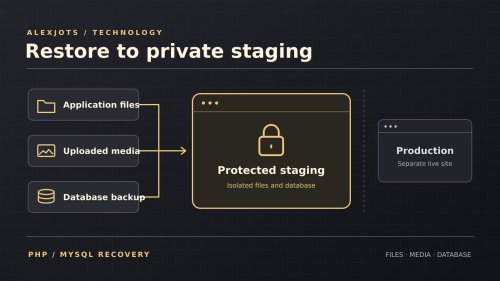
Schedule a backup restore into a separate environment. Verify that it includes the files and database you need, then test a login and an ordinary site task. Record how long it took, who can do it and what was missing. If orders are managed in a shared spreadsheet, use these four digital security checks for a small business to test who can view it, who can edit it and what can be restored. AlexJots guide to safer deployments and recovery.
Share
What's Your Reaction?
 Like
0
 Dislike
0
 Love
0
 Funny
0
 Angry
0
 Sad
0
 Wow
0