
How to Safely Restore a PHP/MySQL Website to Staging on Hostinger
Restore a custom PHP/MySQL site to private Hostinger staging. Verify backups, isolate the database, and test routes, uploads and a one-record rollback.

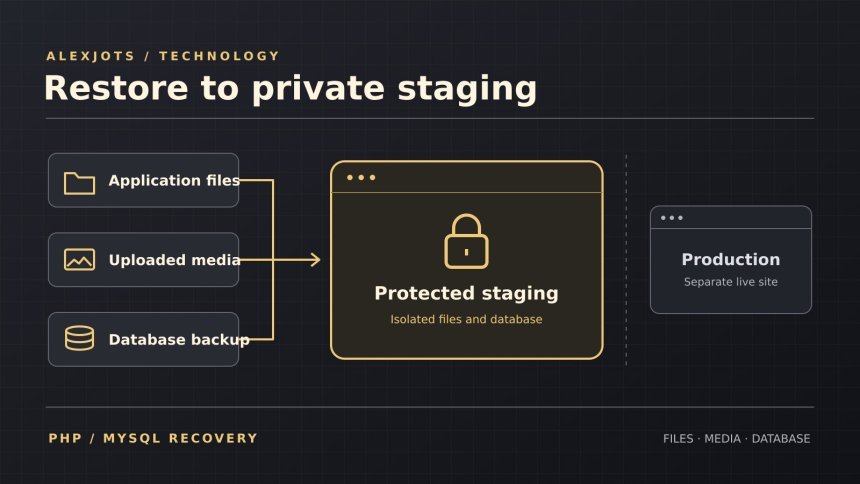
A backup earns its keep when you can restore it and show that the restored site works. For a custom PHP site, you need three pieces from the same recovery point: the application, uploaded files and the database. This walkthrough takes you through restoring those pieces to a password-protected Hostinger staging site, checking where the app reads and writes, and rehearsing a one-record rollback.
The examples use CodeIgniter 4. For another PHP application, use its documented public directory, configuration and recovery tools. Use a hosting plan that lets you separate staging files, credentials and the database from production. Hostinger’s manual restore workflow · CodeIgniter deployment guide
What AlexJots verified in November 2026. Saved evidence shows that sampled signed-out staging pages required authentication. The team confirmed that the staging editor could save an article, that a link between staging articles worked, and that a targeted rollback reproduced the original stored body’s SHA-256. A separate SQL restore matched a defined sample of stored records. The end-to-end procedure and the sample commands below are illustrative. The rehearsal record does not establish a coordinated files, media and database restore.
Before you start
- Get authorised access to the staging website in hPanel, File Manager or an approved file-transfer tool, and phpMyAdmin or an approved SQL client. Have a staging-only CMS account for later checks.
- Set aside private working storage for application files, media and SQL. Use synthetic or appropriately sanitised records where possible. Confirm you are allowed to copy the data and that the application licence permits the staging deployment.
- Record the application and framework versions, the PHP version serving web requests, its extensions, the database engine and version, and the connection driver. Compare the destination against the requirements for your installed release. The command-line PHP version can differ from the web runtime. MySQL and MariaDB dumps can also contain engine- or version-specific features. Hostinger’s PHP selector can affect other websites on the plan. If production shares the setting and staging needs a different runtime, use a separately configured environment. Hostinger PHP configuration · CodeIgniter server requirements · Supported PHP releases
1. Verify the backup set
Keep the originals in private storage outside every served directory. Work from copies. Check that the code, media and SQL cover the same recovery point. Look for the application and deployable dependencies or lock file, the public entry point and rewrite configuration, and the uploaded files or a corresponding object-storage export. A Hostinger backup archive can cover multiple websites on a plan. Identify the files for your site before copying anything to staging. Hostinger’s backup upload guide
Before extracting, inspect the archive paths and link entries. Stop if a member can write outside the destination or replace the staging access gate. Use a new private directory and an archive tool that rejects unsafe paths. On a private GNU/Linux machine, these illustrative commands list two tar archives, check gzip integrity on the SQL export and record a manifest from trusted originals. Check each command’s exit status before moving on.
tar -tzvf application.tar.gz > application-files.txt
tar -tzvf uploads.tar.gz > upload-files.txt
gzip -t database.sql.gz
sha256sum application.tar.gz uploads.tar.gz database.sql.gz > SHA256SUMS
Keep the trusted manifest separately. At the destination, run the following from the directory with the transferred copies and the trusted manifest.
sha256sum --check SHA256SUMSMatching hashes establish that the copies contain the same bytes as the reference. Review the inventory and backup dates separately to establish what the set contains. GNU SHA-2 utilities
Before importing, review the SQL privately as executable code. Look for CREATE DATABASE, USE, schema-qualified names, DROP statements, triggers, views, routines, DEFINER clauses and scheduled events. Include executable comments in the review. Choosing a database in phpMyAdmin does not override a USE statement in the dump. Stop if the dump could target another schema or install an event that can run before the first website request. Use a reviewed single-schema export and keep the original intact. MySQL dump loading · MySQL executable comments · MariaDB comment syntax
2. Set up private staging before the first request
Give the staging hostname its own document root, private application directory, uploads and writable paths. Use a separate database and account. Keep the staging environment out of public sitemaps and feeds.
Apply server-level password protection over HTTPS to the served staging directory. Plan to check a direct upload URL as well as a page because a CMS login screen can leave static files reachable. Add a staging-wide X-Robots-Tag: noindex or a suitable robots meta directive as a second layer. The access gate keeps private content private. A crawler must be able to see a directive to act on it. Keep the gate in place when checking the directive in an authorised response. Hostinger directory password protection · Google’s noindex guidance
Before the restored app starts, review email, payments, webhooks, RSS imports, scheduled jobs, analytics, advertising and shared writable storage. Check hosting jobs and SQL events as well as app settings. For each service, record whether it is absent, disabled or pointed to a designated test destination with separate credentials. Stop before starting the app if an enabled service or job could contact production or its destination is unclear. OWASP Secrets Management Cheat Sheet
3. Restore the files and import the SQL
- Confirm the destination. In hPanel, select the staging website before opening File Manager. Match the hostname and target directory to your notes. Stop if you see a production path or the copy could overwrite staging protection or configuration. Extract the working copy into a private staging location and put only the intended files in each destination.
- Restore the public entry point and uploads. In CodeIgniter 4, the web server should expose the contents of the framework’s
public/directory, including its front controller and public assets. Keep application code, private configuration, logs and archives outside the web root. If the host fixes the served directory, use the supported two-directory deployment and check the paths from the front controller to the private app. Restore uploads to staging storage and give the web runtime only the permissions it needs. CodeIgniter shared-hosting deployment - Import into a verified empty staging database. In hPanel, create a dedicated database and account with staging-only permissions. If the import requires more privileges than the app, use a separate staging-only import account where supported. Confirm the selected schema in phpMyAdmin before importing the reviewed SQL copy. If the import fails partway through, record the error and inspect the partial result privately. Use a fresh, isolated target for a clean retry. Hostinger’s database import instructions
- Configure the stage before boot. Set the staging base URL, database host, schema, account and connection group using private configuration. Check server-provided environment variables and configuration caches for overrides. Restore neither production secrets nor production service settings into the running stage. Recheck the access gate and integration settings before the first app request. CodeIgniter configuration · CodeIgniter database configuration
4. Verify the database the app actually uses
An import confirms which database the SQL client used. The website can connect to a different schema or use a different account. Through an existing restricted diagnostic or an approved private check of the actual web app connection, compare the results of this illustrative read-only query against the expected staging values.
SELECT DATABASE() AS active_schema,
       CURRENT_USER() AS authenticated_account,
       VERSION() AS server_version;
Use the connection group used by the page or editor you plan to test. Review the effective account’s privileges, including global and schema grants, relevant object grants and roles. Use the installed engine’s grant and role syntax. A phpMyAdmin administrator’s grants may differ from the CMS account’s grants. If you cannot confirm the effective account and that its permissions are limited to approved staging resources, pause before any application write. Keep credentials, account names and raw grant output private. MySQL SHOW GRANTS · MariaDB SHOW GRANTS
Compare the restored table inventory and row counts with the backup, then check selected records and their relationships. For example, if your test set contains ten articles and three covers, compare the stored bodies of two articles and confirm that one cover relationship resolves to the expected file. Record the scope of the comparison alongside its result.
5. Run the staging pass/fail checks
Start signed out, then use a separate authorised browser session after the integration review. Record the expected result, HTTP status, final hostname and any relevant header. Stop before following a redirect away from staging.
| Check | Pass condition |
|---|---|
| Anonymous access | The access gate blocks the home page, one article and a known direct upload. Basic authentication should return 401 with a challenge. |
| Authenticated home and clean route | Both return HTTP 200 on staging, render the expected content and carry the intended noindex header or applicable meta directive. |
| Known uploaded image | Returns HTTP 200, the expected image content type and an approved staging storage origin. When a trusted copy of the same representation exists, compare SHA-256. Record a missing reference as a limit. |
| Deliberately missing route | Returns an actual HTTP 404 on staging. A styled error page returning 200 fails the check. |
| CMS and database | A staging-only account can open the designated record. The effective schema, account and privileges match the intended staging configuration. |
| Integrations and jobs | Each applicable integration is disabled or points to a designated test destination. Hosting jobs and SQL events cannot reach production. If a synthetic event is authorised, it reaches only the expected test sink. |
| Runtime and logs | Web PHP, extensions and writable paths meet the application’s requirements. Staging logs show no unexpected errors for the checked requests. |
This illustrative command prints the first response headers for an anonymous GET and discards the body. It uses TLS verification and does not follow redirects.
curl -q -sS -o /dev/null -D - --max-time 20 https://stage.example.test/example-articleUse your own staging hostname. Inspect authorised responses in the browser’s Network panel and keep credentials out of shell commands and shared records. Redact private hostnames, cookies and tokens before sharing evidence. curl command-line options
6. Rehearse a one-record rollback
Use a disposable, unpublished staging record. In this illustrative example, the record is named Restore rehearsal note and its body is Version A. Before changing it, save an exact one-record baseline with the stored body, relevant settings and relationships. A rendered page can look identical even when the editor has changed its stored HTML.
SELECT id, OCTET_LENGTH(body) AS body_bytes,
       SHA2(CAST(body AS BINARY), 256) AS body_sha256
FROM demo_articles
WHERE id = 9001;
Replace the sample names and ID with the staging fixture values. Use the same query and connection each time. Require exactly one row, a non-NULL byte length and a non-NULL 64-character hexadecimal digest. MySQL SHA2 · MariaDB SHA2
- Capture the baseline. Change Version A to Version B on the disposable staging record. Confirm the stored hash changes and the editor or staging preview shows the new text.
- Before rolling back, recheck the staging schema, record ID and Version B hash. If the record changed after your save, stop and investigate the concurrent edit. Use the agreed recovery method for this one record. A full database reimport can overwrite unrelated work.
- Require the original byte length and SHA-256 after rollback. Compare the title, slug, visibility, publication date, asset links and other captured fields or relationships. Record an expected modification timestamp separately. Confirm the staging preview no longer shows the test text. If the editor normalises the HTML and the hash differs, record the rollback as failed and investigate before taking any broader action.
Troubleshoot the first failed check
| Symptom | Where to start |
|---|---|
| The import selects a different database or fails partway through | Stop. Review the dump for schema selectors and compatibility issues. Inspect the partial import only in staging before deciding how to retry. |
| The import succeeds, but CodeIgniter reports access denied | Check the effective connection group, database host and runtime account. CodeIgniter 4 MySQLi access-denied guide |
| The homepage works but clean routes return 404 | Check the served directory, front controller and rewrite configuration. CodeIgniter 4 routing checklist for Hostinger |
| An image points to production or works while signed out | Check the resolved image URL, the storage adapter and which paths the staging access gate covers. |
| The CMS login loops or the editor errors | Check staging cookie settings, the web PHP runtime and writable paths, then inspect the staging logs. |
| The rollback hash differs | Confirm the schema and row, then compare stored bytes privately. Check for editor normalisation or an intervening edit before any further write. |
Clean up and record the result
Remove temporary diagnostics and working archives from served paths only after confirming the staging target and retaining the private originals. Verify file removal in the staging listing. A separate protected URL check can confirm the retired diagnostic is no longer served. A signed-out 401 establishes access denial and leaves file existence unresolved. Keep the backup, trusted manifest and redacted test record in private storage. If a secret was exposed, have the responsible owner contain the exposure and follow the credential-rotation process.
Mark the rehearsal pass when the applicable staging checks and the scoped rollback pass. Record each unresolved check as pending with its symptom and owner. A useful rehearsal leaves you with an exact record of what you restored, what you checked and where you would stop during a real recovery.
Share
What's Your Reaction?
 Like
0
 Dislike
0
 Love
0
 Funny
0
 Angry
0
 Sad
0
 Wow
0